
Hey there, tech enthusiasts! I'm here today to tackle a question that's been buzzing around in the tech community: "Can I upgrade my existing power supply to a single rail one?" As a supplier of single rail power supplies, I've got the lowdown on this topic and I'm excited to share it with you.
First off, let's break down what a single rail power supply is. In simple terms, a single rail power supply delivers all of its power on a single +12V rail. This is different from multi - rail power supplies, which split the +12V power across multiple rails. The main advantage of a single rail power supply is that it can provide a higher continuous current on the +12V rail. This is great for high - end components like powerful graphics cards and CPUs that require a lot of power.
Now, the big question: can you upgrade your existing power supply to a single rail one? Well, the short answer is yes, you can. But there are a few things you need to consider before making the switch.
Compatibility
The first thing you need to check is the physical compatibility of the new power supply with your computer case. Different power supplies come in different form factors, such as ATX, SFX, and TFX. You need to make sure that the single rail power supply you choose fits into your case. Measure the available space in your case and compare it with the dimensions of the power supply you're interested in.
Next, you need to look at the connectors. Your motherboard, graphics card, and other components require specific connectors to receive power. Make sure that the single rail power supply you're considering has all the necessary connectors. For example, most modern graphics cards require an 8 - pin or 6 + 8 - pin PCIe power connector. If your new power supply doesn't have these connectors, you won't be able to power your graphics card properly.
Power Requirements
Another important factor is your power requirements. You need to calculate how much power your components need. You can use an online power supply calculator to get an estimate. Add up the power consumption of your CPU, graphics card, hard drives, fans, and other components. Make sure that the single rail power supply you choose can provide enough power to meet your needs. It's always a good idea to choose a power supply with a little extra wattage to allow for future upgrades.
Benefits of Upgrading to a Single Rail Power Supply
If you've determined that upgrading to a single rail power supply is feasible, there are several benefits you can enjoy.
Higher Current Delivery
As I mentioned earlier, single rail power supplies can deliver a higher continuous current on the +12V rail. This means that your high - power components will receive a more stable and consistent power supply. This can improve the performance of your computer, especially when you're running resource - intensive applications like gaming or video editing.
Simplified Cable Management
Single rail power supplies often have fewer cables compared to multi - rail power supplies. This can make cable management in your computer case much easier. Neat and organized cables not only look better but also improve airflow inside the case, which can help keep your components cool.
Our Single Rail Power Supply Offerings
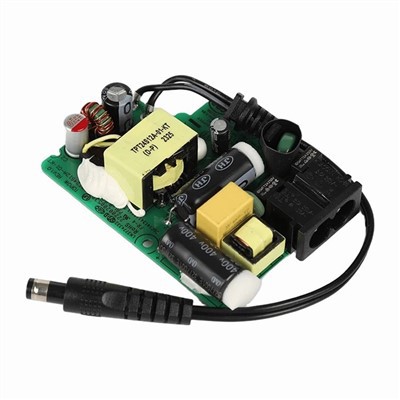
At our company, we offer a wide range of single rail power supplies to meet different needs. Whether you're a casual user or a hardcore gamer, we've got you covered.
Medical Open - Frame Power Supply
Our medical open - frame power supplies are designed for medical equipment and other sensitive applications. They offer high reliability and safety features, making them suitable for use in healthcare settings. These power supplies are built to strict quality standards and are backed by our excellent customer support.
Regulated Switching Power Module
Our regulated switching power modules are ideal for use in a variety of electronic devices. They provide a stable output voltage, which is essential for the proper functioning of sensitive components. These power modules are compact and efficient, making them a great choice for space - constrained applications.
PCB Mount Power Supply
If you're looking for a power supply that can be easily integrated into your printed circuit board, our PCB mount power supplies are the way to go. They are designed to be mounted directly on the PCB, saving space and reducing the need for external wiring. These power supplies are available in different wattages and configurations to meet your specific requirements.
Making the Upgrade
Once you've chosen the right single rail power supply for your needs, it's time to make the upgrade. Here's a step - by - step guide to help you through the process:
- Power Down Your Computer: Make sure your computer is turned off and unplugged from the power source.
- Open Your Computer Case: Remove the side panel of your computer case to access the internal components.
- Locate the Existing Power Supply: Find the existing power supply in your case. It's usually located at the top or bottom - rear of the case.
- Disconnect the Cables: Carefully disconnect all the cables that are connected to the existing power supply. Make sure you remember which cable goes where. You can label the cables if you need to.
- Remove the Existing Power Supply: Unscrew the existing power supply from the case and carefully remove it.
- Install the New Power Supply: Place the new single rail power supply in the same position as the old one and screw it in place.
- Connect the Cables: Connect all the cables from the new power supply to the appropriate components. Double - check that all the connections are secure.
- Close Your Computer Case: Put the side panel back on your computer case.
- Power On Your Computer: Plug your computer back into the power source and turn it on. Check if everything is working properly.
Conclusion
Upgrading your existing power supply to a single rail one is definitely possible, but it requires careful consideration of compatibility and power requirements. If done correctly, it can offer several benefits, such as higher current delivery and simplified cable management.


If you're interested in purchasing a single rail power supply, we'd love to hear from you. Our team of experts is ready to help you choose the right power supply for your needs. Whether you have questions about compatibility, power requirements, or installation, we're here to assist you. Don't hesitate to reach out to start a procurement discussion.
References
- "Power Supply Basics" - PCMag
- "Upgrading Your Power Supply" - Tom's Hardware